MCP in Rig
Rig runs a local MCP hub so Cursor, Claude, Codex, Copilot CLI, OpenCode, Pi, Windsurf, VS Code, or any other MCP client can read live logs, check status, and restart processes — without pasting stack traces or granting a raw shell.
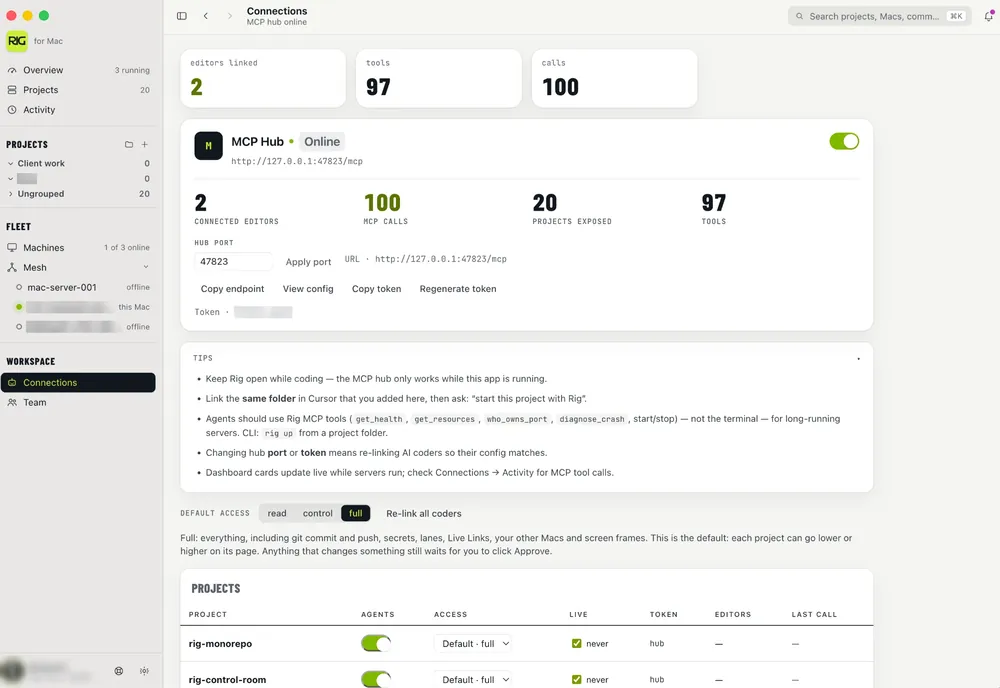

Link an editor
- Open Connections (or AI / MCP) in Rig.
- Start the MCP hub if it is not already running.
- One-click Link Cursor (or Claude / Codex / Copilot CLI / OpenCode / Pi / Windsurf / VS Code). Any other MCP client can paste the hub JSON.
- Confirm the editor shows Rig tools available.
- Ask the agent to list projects, start the right one, then open its URL — not a random localhost.
Works with
One-click Link in Connections for the first six. The rest paste Rig’s generic hub JSON.
Also one-click: Windsurf and VS Code.
On Windows
Linking works the same way on Windows. The hub uses the same address, Rig writes the same editor settings files inside your user folder, and editors that start Rig as a command use %APPDATA%\Rig\bin\rig-mcp.cmd. The token lives in %APPDATA%\Rig\mcp.json (on a Mac, ~/Library/Application Support/Rig/mcp.json).
Hub port vs project ports
Two different things people (and agents) mix up:
- MCP hub — usually
http://127.0.0.1:47823/mcp. That’s how the editor talks to Rig. It is not your app homepage. - Project ports — whatever each app binds (3000, 5173, 8787…). Rig tracks these per project as
detectedPort/localUrl.
What the agent can do
Scoped tools (names may vary slightly by build):
list_projects/get_project/get_status/add_projectstart_project/stop_project/restart_projectget_logs/diagnose_crash/get_healthwho_owns_port/kill_port/set_portopen_url— always withproject_id; prefer omittingurlso Rig opens the bound project’s live URL- Env profiles, local Postgres/Redis, optional local HTTPS helpers
Watch the MCP activity feed in Rig so you know what the agent touched.
How to prompt the agent
- “Use Rig MCP — start this project and open its URL.”
- “What’s on port 5173? If it’s another Rig project, don’t open it for me.”
- “Pull the last 100 log lines for project X and tell me why it crashed.”
Project-scoped vs hub-wide MCP
You can link the whole hub (all projects) or a single-project token. Project-scoped tokens can only act on that project — safer when the editor workspace maps 1:1 to a Rig project.
Stdio bridge
Some editors prefer stdio MCP. Rig ships a bridge that talks to the local HTTP hub, and Link sets it up for you. For a client Rig cannot link, run npx -y @userig/mcp; it reads the token from Rig’s mcp.json. Confirm the hub URL in Connections if you changed the port.
Troubleshooting
- Hub must be running; restart it from Connections.
- Editor config must use the current token (regenerate invalidates old clients).
- Agent opens the wrong localhost — update Rig (MCP
open_urlnow refuses ports that don’t belong to the given project) and re-link so guidance refreshes. - Port conflicts on the hub itself — change the MCP port in Rig and re-link.
- Firewall / VPN blocking localhost is rare but worth checking.
Related
Related
- Add a project and start it
- Ports, crashes, and reclaim
- ACP vs MCP in Rig
- Troubleshooting FAQ
- MCP for coding agents: servers, config files, and tokens
- MCP config generator
- MCP config file locations: where each coding agent reads its servers
- AI & MCP guides
- What is MCP?
- Connect Cursor
- Connect Claude
- Connect Codex